COLORSOFT QCW SOFTWARE
HOW DO YOU USE A COLOR SOFTWARE?
............
| . |
|
|
| ............ | ||
Quality Control of Colored Products:
Color Computers serve industry as a quality assurance tool that verifies that production of critical colored products meet color specifications. Like any other quality-gauging tool, methods and procedures need to be developed and documented and operators require training and good supervision.
1. DEVELOP COLOR MEASURING PROCEDURES:
Measuring Technique - Color measurement instruments generate their own light that is projected through an opening in the instrument (aperture) illuminating the material to be measured. Reflection color instruments typically need to touch the complete aperture surface to the sample at the same angle, usually flat, each time you measure. If you do not use the same technique to contact the sample with the color instrument you will create great variance from measurement to measurement. Most color computers allow you to take several measurements and average them into one set of measurement data. Averaging allows you to sample a material in several places or in one general area in several directions. A good test of sample presentation method is:
1- Place a sample on your color instrument and measure several times without moving the sample or instrument. Save the data and note the color differences. This test indicates the precision of the instrument with your materials, without operator effect.
2- Place the sample on your color instrument and measure once. Now take the sample off and put it on again and measure the sample. Save the data and note the color differences.
Compare methods 1 and 2. If they are very different, you need to improve your sample presentation method.
Test variability of materials to be measured - the second concern of measuring a sample is the uniformity of the materials and the structure of the materials. To test sample uniformity, select a typical sample of your materials. Take measurements in one location, then measure in the same manner across the surface and in several locations. Study the data. If the variability is greater than the measurements in one location, your procedure decisions; are either to always measure in a single location or to sample the materials and average into one measurement. Test repeatability of the method on the same sample. It should approximate the repeatability of your instrument in one location.
The structure of the material may cause color measurements to be different with variance of sample presentation direction (directionality). To test directionality, measure 4 times in the same location, turning the sample or color instrument 90 degrees to the sample between each measurement. Also take the same part and average 4 measurements at 90 degrees into one measurement. Compare the data. Often directionality can cause significant color differences that can be overcome by averaging 90-degree measurements into one color measurement.
2. SETTING INSTRUMENTAL COLOR SPECIFICATIONS:
- Color instruments provide a tool that allows you to measure colors and save the data in your computer. When you make colored materials, the day you make them, they begin to change. With a color computer, the day you measure the color, you have captured the color of the material as it was and the data will not change. The color specification should include:
- Identity of materials
- Sample preparation procedure
- Measurement procedure (# of readings, presentation method, temperature, humidity)
- Identification of instrument, manufacturer, model, geometry, setting.
- Color difference scale (CIE L,a,b, CMC, etc.)
- Observer (2- or 10-degree)
- Illuminant (D65, A, F2, etc.)
- Date and time when specification was created
- Range of acceptable color tolerances
3. USE OF A COLOR COMPUTER AS A COLOR QUALITY CONTROL DEVICE:
| ...... |
- The color computer can be used to check the color of incoming material, measure and document the color of products as produced, quality control batches of materials produced and report the color of shipments within tolerance to your customers. The definition of acceptable color tolerances needs to be addressed both internally and with your suppliers and customers. Once a commercial specification has been agreed to, the color computer can assure that, batch to batch, the materials meet customer color requirements.
 |
 |
| With advanced quality control features. |
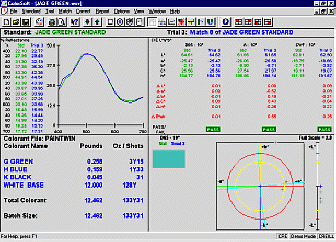 |
To establish a tolerance, buyer and seller must agree to one or more samples that they agree are visually acceptable as judged under controlled lighting and viewing conditions.
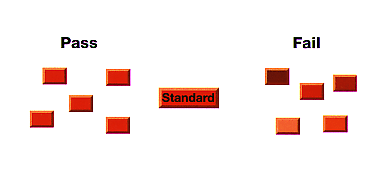 |
Measure the samples that are both acceptable and that are not acceptable. Set upper and lower limits for each color difference function under one or more illuminants. Document and store data.
If there are no samples to use, plus or minus 3-standard deviations or 1.5 Delta E or CF can be a good starting place. A commercial standard should always be set measured against the same materials manufactured with the same colorants made in the same process. One of the difficulties is when color matched samples are made in the laboratory and presented to a customer for approval. The customer approves a sample and typically keeps an example for reference. When commercial production begins, due to scale up to plant production the color will often shift away from the laboratory process. Often it is costly to exactly match the production output to the laboratory process. In this case it can make sense to review the color shift and the economics of the color shift with the customer. Jointly, buyer and seller need to resolve the conflict and work out the best-cost, color performance issues and may decide to shift the color standard and tolerances to benefit of color consistency and process economies.
4. USING A COLOR COMPUTER AS A COLOR MIXING TOOL:
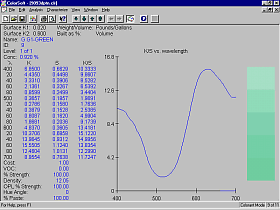
Color Computers can be provided with software that allows the user to measure a new color and predict the best mixture of materials to color match the new color. The color mixing software requires that the user produces a series of samples that calibrate each of the basic colorants in the mixing pallet.
|
||
| Colorant Database Screen. | Match Output Screen. | |
 |
 |
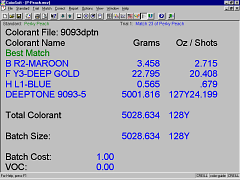 |
- Once colorant calibration databases have been completed, your color computer can measure special colors and match them in minutes. This speed of matching often provides a critical competitive advantage when a fast match assures your customer of fast matches of critical new colors. In some cases, your customers will bring in colors made of materials outside the range of your colorants. Most color matching systems will provide the best color mixture prediction that can be matched with your colorants warning that your predicted match is outside the limits of your colorants. Knowing that you have a problem color to match can be as important as giving the perfect match. This will save you time and prevent the waste of materials.
5. WORKING OFF OLD OR MISMATCHED COLORS WITH A COLOR COMPUTER:
- Color computers can use the color mixing logic to help you rework old colors or colors that came out off color. The old colors can be treated as a batch to be corrected and colors added to match a new color. Or old colors can be calibrated as a colorant and the software "forced" to use the old color as part of revised color formulas. Another technique is to blend old or scrap colors by color "family", then calibrate the blend as a rework batch and correct to a new color or work off as a colorant. In many applications such as printing and plastic manufacturing the process creates a constant flow of return materials or scrap. Rework of these materials using a color computer can often pay for a color system in a few months.
6. CORRECTING PRODUCTION BATCHES WITH YOUR COLOR COMPUTER:
- Color computers can predict batch corrections most accurately when calculating corrections based on standards with the same colorants as the batch being manufactured. Metameric batch corrections should be treated with caution. Batch correction by color computer speeds production by decreasing the number of corrections required and provides better batch-to-batch production consistency. The color computer will develop the correction quickly and dependably with good controls. Programs are available to allow you to hold back colorants and provide one-shot corrections or to hold one material constant and change the other colorants.
COMMERCIAL BENEFITS OF COLOR COMPUTERS
In summary, a color computer is more precise and accurate with much greater consistency than a human is. It is vulnerable to poor procedures and misuse, which are basically human failures. Typically industry has justified the cost of color instruments and color software based on a range of commercial benefits:
 Incoming color control of colorants assures more consistency in all production operations.
Improved color Quality in parts production.
Improved color Quality in color matched assemblies.
Documentation of machine and process start up variances of colored products.
Statistical Process Control color input methodology.
.Development of ISO 9000 and other ISO compliance.
Documentation of color specifications between buyer and seller.
Improved speed of new color matches.
Confidence in new matches that the colors can be achieve with typical materials of manufacture.
Backup of physical standards.
Documentation of matched colors and color formulas.
Communications of color standards between multi plant operations.
Speedy Batch Correction expands plant capacity by turning batch approvals faster.
Recycle of rework batches and scrap lowers material costs.
Rematches with lower cost colorants lowers material costs and improves RMC competitively.
Portable color instruments take testing to the plant and field, solving and documenting color problems.
Portable color instruments in the hands of a dealer or sales person can provide a competitive advantage.
| ...... |
| <HOW DO YOU USE A COLOR COMPUTER?> |
| ...... |
| Glossary of Color Terms. |
| ...... |
| Copyright © 1998,2009 ColorTec Associates, Inc. All rights reserved. All other manufacturers’ trademarks acknowledged. |
| ...... |